
Bu projeyi gerçekten kurmak istersen parçaları hobidevre.com'dan temin edebilirsin →
Build it for real
To build this project for real, get the parts from hobidevre.com → hobidevre.com →
More build guides: hobidevre.com/blog
The pins you need
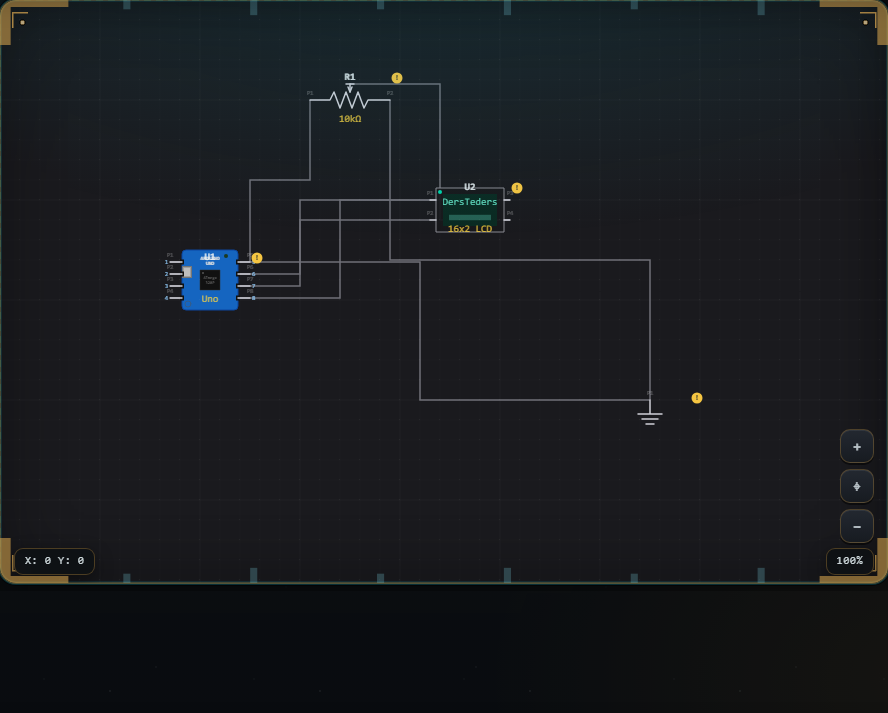
A typical 16x2 module has 16 pins. In four-bit mode you use the data pins D4 to D7 plus two control pins: RS (register select) and E (enable). Read/write is tied to ground because you only write to the display. Power goes to 5 V and ground.
Pin VO controls contrast. Connect it to the wiper of a 10 kΩ potentiometer whose other two legs go to 5 V and ground. Without this adjustment the screen may look completely blank even though it is working.
Backlight pins are usually labelled A (anode) and K (cathode). Many modules include a current resistor on board; if yours does not, put about 220 Ω in series with A. Connect K to ground.
One working pin map
- RS to digital pin 7, E to digital pin 8
- D4, D5, D6, D7 to pins 9, 10, 11, 12
- RW to ground, VO to the contrast potentiometer
- VSS to ground, VDD to 5 V
Any free digital pins will do as long as you pass the same numbers to the library. Keep the wiring short and tidy: eight or more jumper wires are easy to misplace by one hole on a breadboard.
Printing text
#include <LiquidCrystal.h>

LiquidCrystal lcd(7, 8, 9, 10, 11, 12);

void setup() {
  lcd.begin(16, 2);
  lcd.print("Hello world");
  lcd.setCursor(0, 1);
  lcd.print("Second line");
}

void loop() {
}
The constructor order is RS, E, D4, D5, D6, D7. begin(16, 2) tells the library the geometry. setCursor(column, row) uses zero-based coordinates, so the first line is row 0 and the second is row 1.
Characters past column 15 wrap or disappear depending on the module. Clear stale text with lcd.clear() before printing a shorter message, but call it sparingly because it is slow.
Beyond plain text
The HD44780 can store a small number of custom five-by-eight pixel characters. Define one with createChar() and display it with write(). This is handy for degree symbols, arrows or simple status icons.
For shrinking displays, reuse the same cursor positions rather than printing a new line each time: overwrite the old digits and pad with spaces so leftover characters do not remain.
Blank screen checklist
- Backlight on, no text: turn the contrast potentiometer slowly through its full range.
- Blocks on both lines: the module powered up without correct initialisation; check the wiring and the
begin()call. - Nothing at all: verify 5 V and ground, and check that A and K are not reversed.
- Garbled characters: one of the four data lines is in the wrong row; recheck D4 through D7 against your constructor.
Get the parts
If you want to build this project in real life, you can get the parts from hobidevre.com.
Frequently asked questions
Why is my display blank?
Adjust the VO contrast potentiometer first. Then check 5 V, ground and the RS/E/data wiring.
Can I use 3.3 V?
Most HD44780 modules are specified for 5 V. Use a level shifter on the signal lines if your board is 3.3 V only.
How many characters can I show?
Sixteen per line across two lines. Longer strings wrap or are lost depending on the controller.