
Bu projeyi gerçekten kurmak istersen parçaları hobidevre.com'dan temin edebilirsin →
Build it for real
To build this project for real, get the parts from hobidevre.com → hobidevre.com →
More build guides: hobidevre.com/blog
Pinout and power
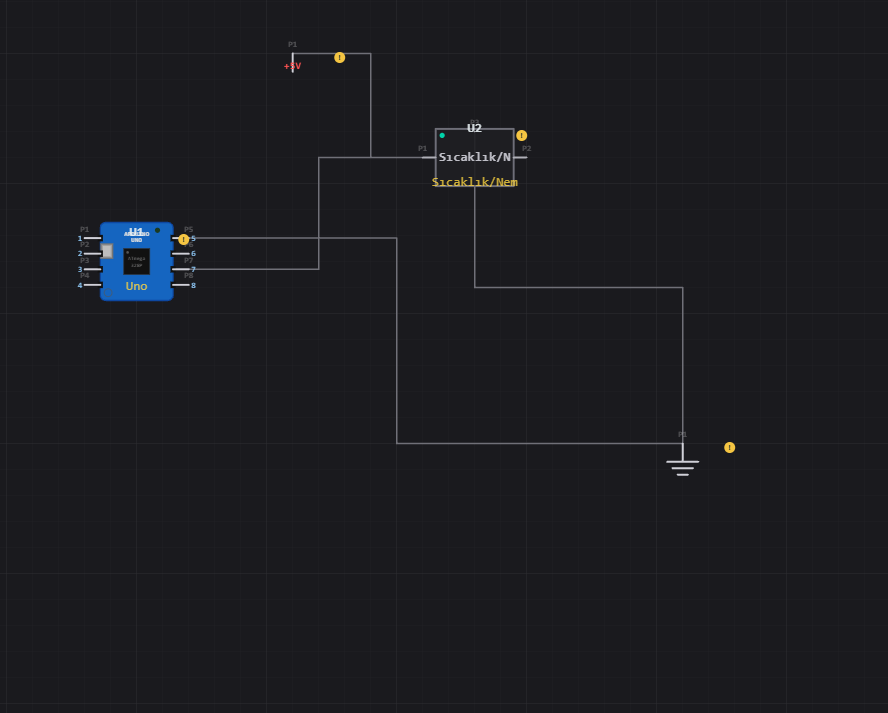
A bare DHT11 has four pins; a common three-pin module breaks out VCC, DATA and GND. Power is specified from 3.3 V to 5 V for most modules. Connect DATA to a digital pin and GND to the common ground.
The data line is open-drain, so it needs a pull-up resistor of about 4.7 kΩ from DATA to VCC. Many modules already include one — check the small board before adding another. A missing pull-up typically shows up as readings that never change.
The 40-bit frame
Each reading is a 40-bit packet sent least-significant bit first: 8 bits of humidity integer, 8 bits of humidity decimal, 8 bits of temperature integer, 8 bits of temperature decimal, then an 8-bit checksum. The checksum is the low byte of the sum of the first four bytes.
The DHT11 reports humidity as an integer percentage and temperature in whole degrees Celsius, with the decimal bytes normally zero. If the checksum does not match, discard the reading and try again rather than trusting the value.
Reading with a library
A sensor library handles the timing-critical part of the protocol for you. The sketch below prints both values once every two seconds.
#include "DHT.h"

#define DHTPIN 2
#define DHTTYPE DHT11

DHT dht(DHTPIN, DHTTYPE);

void setup() {
  Serial.begin(9600);
  dht.begin();
}

void loop() {
  float nem = dht.readHumidity();
  float sicaklik = dht.readTemperature();

  if (isnan(nem) || isnan(sicaklik)) {
    Serial.println("sensor okunamadi");
  } else {
    Serial.print(sicaklik);
    Serial.print(" C  -  ");
    Serial.print(nem);
    Serial.println(" %RH");
  }
  delay(2000);
}
The library returns NaN when a reading fails, so check for that before printing. Two seconds between reads respects the sensor's slow conversion cycle.
Know the limits
A DHT11 is an inexpensive educational sensor, not a precision instrument. Typical specifications cover 0-50 °C with about ±2 °C accuracy and 20-80% relative humidity with about ±5% accuracy. It cannot measure near 0% or 100% RH reliably.
Do not use it for medical decisions, food safety or anything where a wrong value has consequences. Allow the sensor to settle after a large environmental change, and keep it away from direct sunlight, heat sources and water droplets.
If you need a wider range or finer resolution, a DHT22 or a dedicated digital sensor is the usual next step; the wiring idea is similar but the data frame and timing differ.
When readings fail
- All zeros: usually a wiring problem or a missing pull-up.
- NaN every time: the sensor did not answer; check the data pin number and power.
- Jumping values: polling too fast. Wait at least one to two seconds between reads.
- Checksum errors: long wires or electrical noise; shorten the cable and keep it away from motor wiring.
Get the parts
If you want to build this project in real life, you can get the parts from hobidevre.com.
Frequently asked questions
Do I need a pull-up resistor?
Only if your module does not already have one. Bare sensors need about 4.7 kΩ from DATA to VCC.
Why do I get NaN?
The sensor did not complete a response. Check the data pin, power, ground and the delay between reads.
Is the DHT11 accurate enough for weather logging?
For a classroom or hobby log, yes. For precise or safety-critical measurements, use a better specified sensor.