
Lessons
Topic explanations with worked examples, split into units.
4 min read
Ladder logic is a visual language used to program industrial controllers. A PLC simulator lets you build a start-stop circuit and watch inputs and outputs respond. Sign-in required.
Create an account to save your progressCreate your account
At a glance
Control logic is hard to follow on paper. Learners often describe the behaviour in words (start the motor, keep it running, stop it when asked) but cannot picture how contacts order the result. A PLC simulator makes each step visible because the inputs and outputs change on screen as the program runs.
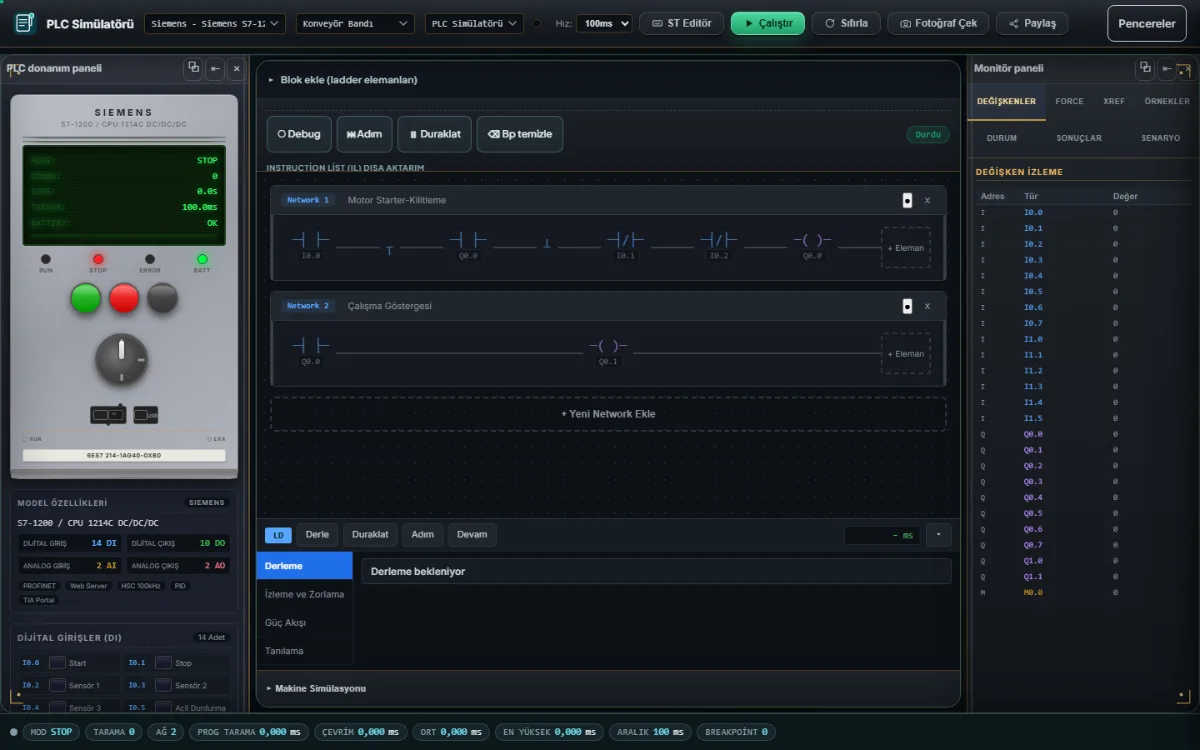
The screenshot shows a virtual Siemens S7-1200 with status indicators, a digital input list such as I0.0 and I0.1, and a monitor table listing addresses I, Q and M. Each ladder network is one rung of logic, and the monitor table shows the value of every address at that moment.
What an account adds to the pages you are reading.
Topic explanations with worked examples, split into units.
Multiple-choice questions with answers you can check.
4 short practice games in maths and science.
424 glossary terms in plain English, and browser simulators.
Step 1. Sign in. The PLC simulator is available to members.
Step 2. Locate the Run and Reset buttons in the top bar. Reset returns the program state to its starting point.
Step 3. Open the block menu, labelled Blok ekle, and choose a contact and a coil for a new network.
Step 4. Add a normally open contact for the start input and a normally closed contact for the stop input. Assign them to I0.0 and I0.1.
Step 5. Add a coil for the motor output and assign it to Q0.0.
Step 6. Add a contact of Q0.0 in parallel with the start contact. This holding contact keeps the output on after the start button is released.
Step 7. Press the Run button, set I0.0 to 1 in the monitor, release it, and check that Q0.0 stays at 1. Then set I0.1 to 1 and confirm that the output turns off.
Scenario 1, motor latch: rebuild the Motor Starter network from the screenshot. Pulse the start input and confirm that the motor output stays on.
Scenario 2, running indicator: the second network in the screenshot uses a contact of Q0.0 to drive Q0.1. When the motor output is on, the indicator output should also be on. Verify that both outputs drop together when the stop input is used.
Scenario 3, emergency stop: the monitor list includes an emergency-stop input. Add it to the holding circuit and observe whether the motor output turns off even while the start input is pressed. Record the order of changes step by step.
Leaving out the holding contact. The motor then stops as soon as the start button is released.
Mixing up input and output addresses. An I address is read from the outside world; a Q address is written by the program.
Using a normally open stop contact. The circuit would stay off until the stop button is pressed, so the stop contact must be normally closed in this design.
The topic belongs to automation and control courses in vocational secondary schools. It also builds on the logic gate and truth table lessons in digital logic, since a contact in series behaves like an AND condition and a parallel path behaves like an OR.
Practise the same start-stop circuit on three separate days instead of once in a long session. On day one, build it from an empty program. On day two, build it again without looking at the notes. On day three, add an indicator output and explain every network before you run it. Short repeated practice helps the holding-contact idea stay in memory, and it is a simple way to apply spaced review to a technical skill.
Finally, compare your monitor readings with what you wrote beforehand. If a coil is on when you expected it to be off, look at each contact in that network in turn and ask whether it should be open or closed in that state.
No. It teaches the logic. Hardware settings, memory and software versions on a real controller can differ.
No. Contacts and coils are enough to start, and the start-stop circuit is a good first exercise.
Yes. The simulator is for members, and programs are saved to the account.
Monitor the values, use Step button to go through the program slowly, and check which network produces an unexpected output.
DersTeders AI
Ask about the part you are stuck on, follow a solution step by step, and revisit the same topic with fresh examples.
Available from your panel. Sign in to open the AI section there.
The library behind these pages holds 5,082 topics and 201,970 practice questions.
Keep learning
Continue with a hands-on project, a browser simulator or a free account.